Archive for the ‘Ubuntu’ Category

June 10, 2010
Filed Under (Linux, Ubuntu) by Ollie Cronk on 10-06-2010

Yeah finally fixed an annoying issue with my Linux Server at home (nice to flex my Linux admin skills!) documenting it here in case I ever need the commands again or its useful to others:

Problem:

Ubuntu 9.04 no longer booted after a minor update (from .15 to .16) with my Software RAID setup as described in these reported bugs:

https://bugs.launchpad.net/ubuntu/+source/mdadm/+bug/330298

https://bugs.launchpad.net/ubuntu/+source/mdadm/+bug/158918

Fix:

Following the instructions on https://bugs.launchpad.net/ubuntu/+source/mdadm/+bug/136252/comments/5 fixed the problem but you need to run update-initfs -u so it updates.

Amazing what you learn when having to fix this kind of stuff – for one I now understand the memory based file system that linux uses during boot better.


April 27, 2009
Filed Under (Linux, Open Source, Ubuntu) by Ollie Cronk on 27-04-2009

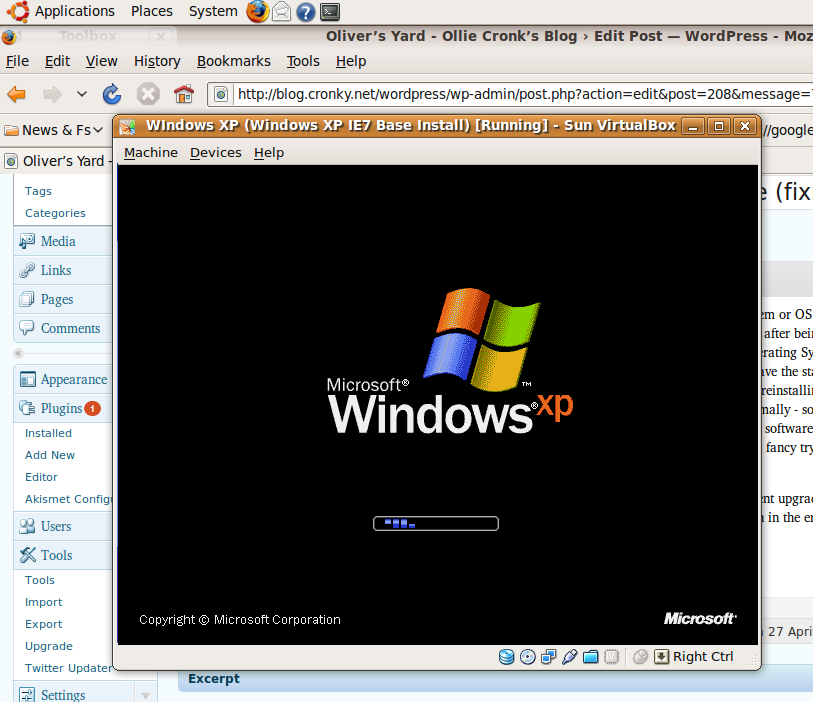
Screenshot of VirtualBox running XP under Ubuntu
Recently I’ve started using Virtualisation – for those who don’t know this is running an Operating System or OS for short (such as Windows) as an application (so you could think of it as running a computer within a computer). I’ve started doing this as I’ve got frustrated with Windows slowing down after being installed for a few months. This way I can run Linux which is very stable and performs consistantly as the main Operating System (or the “Host”) and then run various “Guest” OS installations – such as Windows. You can take snapshots or save the state of the Guest machines – which is ideal if you want to go back to how your Windows install used to be (but unlike reinstalling all your applications and settings are as they were).

Generally Windows runs at the same speed as it does normally – so long as you don’t run too much stuff on the Host OS at the same time – but of course there are limitation – eg Games or software that needs access to devices that can’t be provided via VirtualBox. And of course you could run the reverse setup – if you fancy trying Linux as a Guest OS but keeping the safety net of Windows as your main Operating System.

Anyway I’m posting this as I’ve been using VirtualBox on Ubuntu Linux to run Windows XP. On a recent upgrade from Ubuntu 8.10 to the latest version 9.04 VirtualBox failed to run. This was fixed by running the command given in the error message (its nice to get a very useful error message in software!)

The command I had to run was sudo /etc/init.d/vboxdrv setup

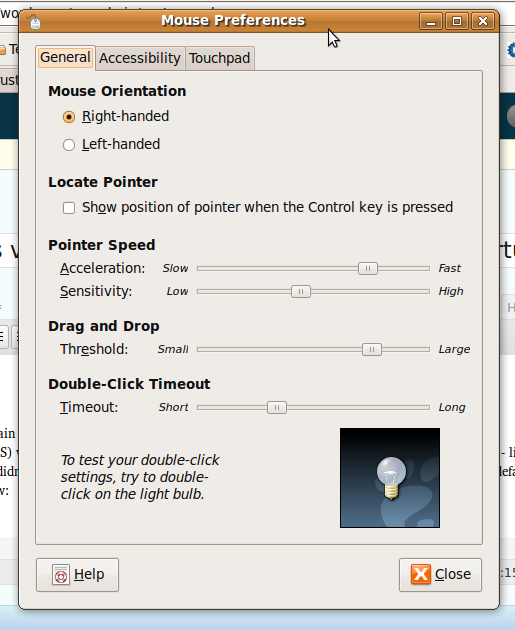
Once VirtualBox was working again I noticed that the Host key (which is the key used in different combinations to switch between the Host and the Guest OS) was not working. Instead it was flashing the Ubuntu desktop and pulsed some circles – like radar – from the cursor. At first I didn’t twig that it was simply the new mouse settings in the latest version of Ubuntu. By default it now seems the tickbox below in System->Preferences->Mouse for “Show position of pointer when the Control key is pressed” :

Mouse Settings in Ubuntu

Mouse Settings in Ubuntu

Hey presto – the host key works again! Hopefully this is helpful for anyone else confused by this one!

Also note the position of the sliders in the above screenshot for acceleration and sensitivity – I find these settings make the touchpad on my Vaio behave in a similar way to Windows (previously my mouse felt too sluggish).

I’m now actually using Windows less and less now at home (Evolution is a decent email client and of course Firefox offer pretty much the same browsing experience – apart from some differences with fonts, and OpenOffice allows for opening the odd Office attachment). The true acid test though is how much the wife moans as previously she’s never been happy without the familarity of Windows…! (But then it is still available in a couple of clicks).

I’m sure there will be more on my adventures of using Ubuntu on the desktop in due course – if I find time I’ll share anything I think others might find useful…


August 30, 2008
Filed Under (Technology, Ubuntu, Web Development) by Ollie Cronk on 30-08-2008

If your not having any joy when installing addons in Firefox 3 (sorry can’t remember the specific error message) – but nothing seem to fix it – even re-installing) we managed to confirm the fix today at work. Note that involves completely clearing all Firefox related info (so settings, bookmarks etc will be gone)…

* Uninstall Firefox
* Then make sure that the C:\Program Files\Mozilla Firefox is completely gone
* Also clear out the C:\Documents and Settings\<<username>>\Application Data\Mozilla folder (it will probably still contain Firefox and Extensions directories)
* Re-install

Voila – you can install extensions again (like the brilliant FireBug)

This also works for Linux (had a similar issue at home with the Latest version of Ubuntu).


July 21, 2008
Filed Under (Open Source, PHP, Technology, Ubuntu) by Ollie Cronk on 21-07-2008

Warning! Techy post – if your not into Web development you’ll want to skip this one…

I’ve been wanting to try out Zend Core (Zend’s standard PHP stack / extension or “Reliable PHP made easy”) for a while but as Ubuntu isn’t officially supported I’ve held off. A problem with some code running on the Ubuntu version of PHP 5 forced my hand – I discovered that its actually not that hard to get ZC up and running on Ubuntu. Thought I’d share in case this is helpful to anyone…

  1. Download, unpack and run the ./install command as per usual
  2. I opted to stick with the version of Apache already installed (as its slightly newer than the Zend bundled one)
  3. My experience of Zend attempting to configure Apache varied – one some boxes it almost worked, others it didn’t. If you find the installer crashing out just untick the configure Apache option and try again.
  4. Once Zend Core has completed you’ll need to tweak things abit…

PHP5 Module

The ZC installer will have probably left your Apache configured with 2 LoadModule php5_module entries (one in /etc/apache2/apache2.conf – thanks to ZC and the other Ubuntu one in /etc/apache2/mods-enabled/php5.load). So you can either do a sudo a2dismod php5 to remove the Ubuntu one or modify the Ubuntu one to the following:

LoadModule php5_module /usr/local/Zend/Core/modules/apache22/libphp5.so

In fact you can be cunning here by commenting out the Ubuntu PHP5 extension and adding the ZC one in this file – allowing you to effectively switch between the 2 different extensions should you need to.

MySQL extension – if you’re using MySQL then you’ll need to watch out for the fact that the bundled MySQL extensions look for the MySQL socket file in /tmp/mysql.sock rather than the Debian / Ubuntu location which is /var/run/mysqld/mysqld.sock

In most cases changing in php.ini:

mysql.default_socket =
to
mysql.default_socket = /var/run/mysqld/mysqld.sock

Does the trick; but alas not in all cases it seems (eg MySQL PDO). Really hacky fix to this (please do let me know if you have something better – other than editing the socket in the /etc/my.cnf file) is to run a scheduled (using crontab) symlink of /var/run/mysqld/mysql.sock to /tmp/mysql.sock

To do this run: sudo crontab -e
and add the following line:

 5 * * * * ln -s /var/run/mysqld/mysqld.sock /tmp/mysql.sock

And for now that works for me. If you want a copy of some of the relevant config files / snippets (including the extra bit that ZC adds to the apache2.conf) then I have zipped them up for ease.

Zend Core itself looks like a good product – being able to access to php.ini options via web based tool is pretty useful, as is knowing you are working on a consistent & tested version of PHP. Its a shame MySQL doesn’t offer a similar free / unsupported version of their MySQL Enterprise in a similar way really…


March 15, 2008
Filed Under (Open Source, PHP, Ubuntu, Web Development, Zend Framework) by Ollie Cronk on 15-03-2008


March 08, 2008
Filed Under (Linux, Open Source, Sony Stuff, Technology, Ubuntu) by Ollie Cronk on 08-03-2008

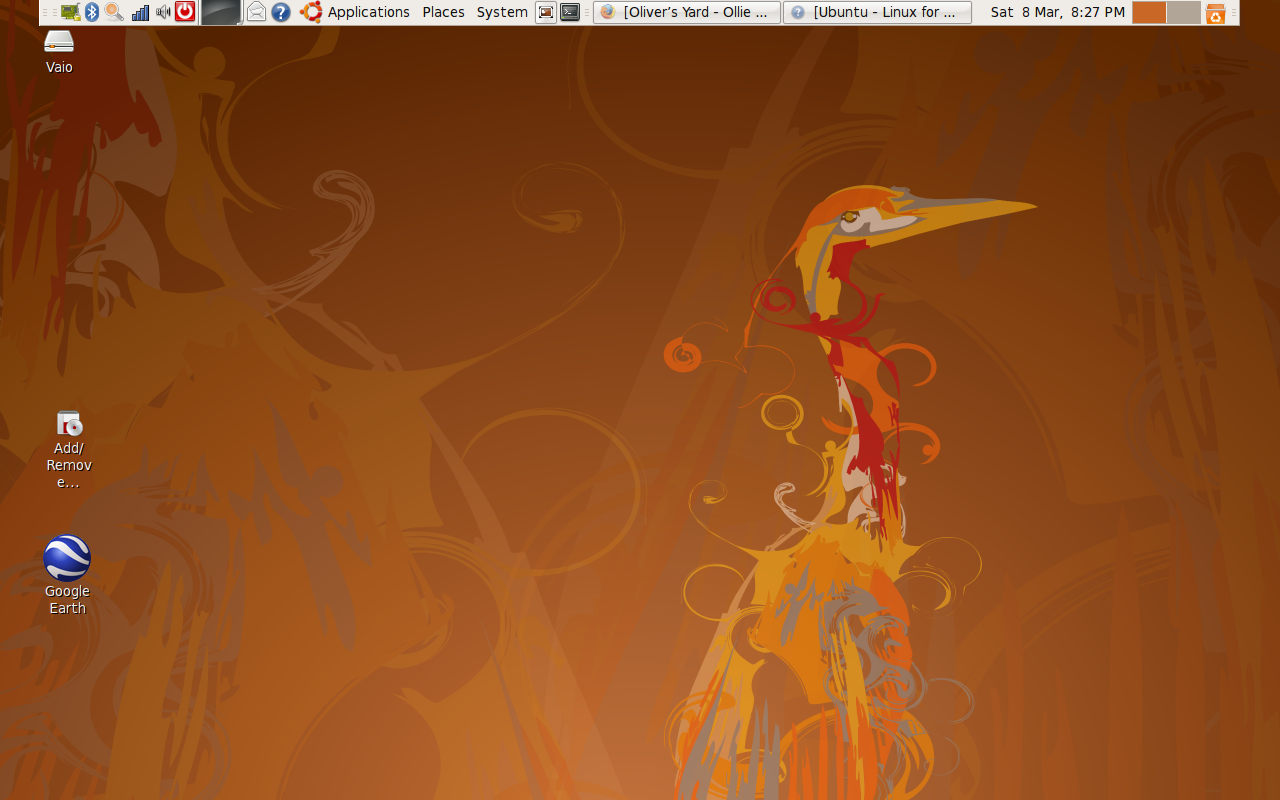
Desktop of Hardy HeronBit of a techy one here (so skip this if your not into Linux!) but sometimes these posts are useful to others!!!

Whilst trying to get my Sony memory stick slot (Mass storage controller: Texas Instruments 5-in-1 Multimedia Card Reader (SD/MMC/MS/MS PRO/xD) working on my Vaio under Ubuntu 7.10 (Gutsy) I came across this bug report where someone recommended trying the live CD of the latest release (Hardy Heron) to see if that fixed the issue.

Not sure is progress on the issue with the memory stick reader has been made – instead of:

[10321.605008] tifm_core: MemoryStick card detected in socket 0:0
[10321.611165] tifm_ms: Unknown symbol tifm_has_ms_pif

I now get:

tifm_core: MemoryStick card detected in socket 0:0

Which is possibly a bit of a backwards step!

However what I did discover is that the alpha (development) version of Hardy – the new 8.04 version of Ubuntu which is due for release next month – is pretty stable. So I have decided to take the plunge and did a dist upgrade (changing the /etc/apt/sources to reference hardy rather than gutsy and then running upgrade-manager -d). So far working well (hopefully not famous last words!!) writing this from it.

This thread (SONY VAIO MEMORY STICK: tifm_7xx1: sd card detected in socket 0)
and another on Ubuntu Forums discusses a similar issue / mounting SD cards and the latter suggests using

sudo mount /dev/tfa0 <mount point>

but this doesn’t work for me – if anyone knows how you look up what a device is likely to be listed as I’d be keen to know (need to do a bit of digging on this). I think I need to resolve the tifm_ms bit first.

I have been contributing the bug report (feels good to give something back after all the years of being a Linux user – now on the way to becoming a tester / bug reporter – who knows one day I might write some code for it!!)

Hardy comes with Firefox 3 beta 3 which seems really good also (hope I won’t be eating my words!) unfortunately Firebug and Google Brower sync (two plugins I can’t live without!) don’t seem to be available for it yet – so I am mostly using FF2 still.


July 19, 2007
Filed Under (Ubuntu, Web Development) by Ollie Cronk on 19-07-2007

2 word summary = Works well! -Here’s a picture of one of the boxes I got in for work recently:

HP Proliant DL385 Server

Thought I’d share a few notes…

Firstly these don’t appear to ship with Optical drives as standard as (after talking to my friend who works at HP) most large customers use network based deployment systems to install the OS.

Not an issue though – just get hold of a USB CD or DVD drive to do the install from. Once I got hold of one of those everything just worked. RAID (using very flashy 2.5″ SAS drives), Ethernet everything – so thought I’d document that as when I ordered not much came up on a Google search for this specific model. And is working well after 3 months of use as a LAMP and SVN server.

Currently we are using 2 in my dev team – one for Wiki and SVN and another to host our LAMP Development work on a central box – Apache 2.2, MySQL 5.0 and PHP 5.2 – having a central development box really helps when working together (I will write an article on that in due course!).

The iLO feature on these boxes is quite cool too – for those of you that don’t know iLO (Integrated Lights out) is basically a mini server inside the server that has its own Ethernet network connection – you can use a web based interface to boot, reboot or even install an Operating System – if you have the relevant HP software). Very handy – particularly when the server isn’t in the same area as you!

At 7city we ordered IBM xSeries servers for LAMP use but those generally needed a little bit of fiddling to work on Linux (an X336 required a Kernel parameter so it would shutdown/reboot properly) none of that needed with these HPs – they just work – very impressed.


May 23, 2007
Filed Under (Linux, Sony Stuff, Technology, Ubuntu) by Ollie Cronk on 23-05-2007

Full post to come on this but a summary – 99% of the features of the laptop (nVidia Graphics, Wireless, Mouse etc) all work out of the box (no messing about at all – it just works!) with Ubuntu Linux 7.04 aka “Feisty Faun”!

Ollie’s Vaio SZ3 running Ubuntu

I am really impressed with Ubuntu 7 – its a very well polished piece of software and what with the news of Dell announcing Ubuntu as a supported/pre-installed operating system in the US I think its starting to reach a level of maturity that makes Linux more accessible to the average user – interesting times…

When I did a google I found a link to related model. I have yet to try out all of its suggestions (such as detecting what graphics card is switched on – from the Stamina/Speed selector switch and changing the X config) but as I learn more I’ll update this post.

Hmm looks like this question on Launchpad might get the Webcam working.


May 23, 2007
Filed Under (Linux, Samba, Ubuntu) by Ollie Cronk on 23-05-2007

The title of this one says it all really, but after spending hours scratching my head with a office file server I built for L.S.A. Ltd (www.travelf1.com) late last year I found the solution to the crashes that started occuring a couple of weeks ago.

See this Ubuntu Server Crash Output file – for the error message that was appearing basically it was a Kernel Oops that occurred when large files were being copied/transferred via samba. It turned out to one of the memory DIMMs going weird which I discovered after having the idea to run a Memtest on the machine (Memtest is available as a boot option when starting up a Ubuntu machine). At first I suspected the software RAID 1 but that’s actually been rock solid on this box and on my home Ubuntu server too.